Aescripts VoxMark V2.3.2 Free Download


| Program Name | Version |
|---|---|
| After Effects / Premiere Pro | CC 2022 + |
Aescripts VoxMark V2.3.2 – Free Download Plugin
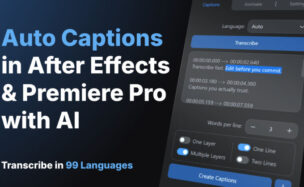
Turn any voiceover into frame-accurate markers and subtitles, automatically. VoxMark renders your comp’s audio mix, transcribes it with the AI provider of your choice, and drops the result as markers or an SRT, with speaker identification and colour-coded voices.
AI-powered voiceover transcription for After Effects. Renders your comp audio, sends it to a Whisper transcription API, and drops the result as timeline markers — directly inside After Effects or Premiere. Grab a free Groq API key – the plugin will provide you with a choice of 3 services with links to create API keys. We recommend Groq where you can transcribe and use for free.
Simply scan your composition for voiceover (maybe solo your VO layers first), then hit transcribe and turn it all into annotated markers, as words or phrases.
New!! Export your transcribed audio out as an .srt file to ingest into Premiere Pro for captioning. Alternatively, you can import an .srt file to markers, without having to transcribe.
Features
- Runs natively in both After Effects and Premiere Pro
- Transcribe voiceover to comp markers in one click
- Choose between segment-level (phrase) and word-level granularity
- Auto-detect or manually set the transcription language
- Split long markers at a configurable character limit
- Import an existing .srt file to create markers without transcribing
- Export comp markers as an .srt subtitle file
- Save markers to memory and restore them later (for unlimited comps) — useful for clearing the timeline mid-project
- Supports OpenAI Whisper, Groq Whisper (free), and AssemblyAI
- Add color to your markers for extra customisation, or have a color per voice actor for differentation
- Use the navigate tab to jump to specific markers using the transport controls, or click the caption directly
For More , please type what you want in the search box, choose the category you want to search in, then press “Search”.
Also Check This out :